For anyone thinking the "single camera, no USB, can't print, can't run flash" iPad is the only game in town, the tablet market is about to get pretty interesting, hopefully before the end of the year. Don't get me wrong, with four million units sold, the iPad has certainly blazed the trail for tablets, and somehow achieved the self-proclaimed status of first-to-market. But like many consumer-facing technologies, first doesn't guarantee best. And from what we're hearing about upcoming tablets from companies like RIM, Samsung and HP, the best is truly yet to come.
While RIM will be releasing a Blackberry tablet targeting business folks, the one to watch is probably anything running Google's Android OS. This should include a Samsung Galaxy which I personally expect to rock the tablet market, or at least my cubicle's market.
Palm and Windows are rumored to also have a tablet OS, but honestly, who cares? (Sorry Microsoft, we do appreciate you inventing the technology, and Steve Jobs stealing it to get us to this point, though).
Finally, if you are still set on the iPad, be sure to follow their chatter about its next generation, also due out by the end of the year - probably to compete with the aforementioned heavy hitters running Android.
This article filed under: tech news, google tablet, Apple and What to get Ben for Christmas.
Showing posts with label technology. Show all posts
Showing posts with label technology. Show all posts
Friday, September 24, 2010

Wednesday, May 20, 2009
Personal (and business) Data Backup Solutions
A comparison of Carbonite and Mozy:
I used to read peoples' articles on data backup and recovery and assume those are the kind of people who NEVER lose data. On the contrary, I now have the feeling they are exactly the kind of chumps who just lost a ton of data and could just slap themselves silly for not acting on that voice in the back of their head telling them "you really need to back up sometime soon or you'll lose all this stuff." Well, I am one of those chumps, and here's my article.
Whether it's photos, songs, your resume or a year's worth of files for work, we've all got something very valuable to lose from our computers, and I've lost my share from each of those categories (and more).
I can certainly go into depth on a good external hard drive, but there's not too much to know there. Get a good deal, but don't go overly cheap. Some offer "one-touch" push button backups, which is basically a bundle of an okay hard drive with an okay backup software package. If it's simple and it works, go for it. Probably the best advice I can offer, comes from the perspective of what you are actually buying... it's not the data backup you care about, it's the recovery! So, if a solution does a great, comprehensive job of saving your data, that's great. But "where the rubber meets the road" is when it comes time for you to get something useful out of that ominous Terabyte of data.
My point - you know how to back up your data, great. Do you know how to get it back?
I'm middle-of-the-road about backing up my files. I carry around two external hard drives, a flash drive for very specific stuff, and at home, I've got a Buffalo Link Station hanging off my wireless network. At work, my code is pretty much taken care of by SQL Server backups and TFS, while I also use a few FTP sites to archive old web sork.
As you can see, this is not the model of a consolidated system I have going here. I recently decided to try an online backup system. Probably the most popular right now is Carbonite. I'm right in the middle of my 30 day trial, so I will defer a greater depth of knowledge to a more thorough review. Vinnie Carpenter's blog has a great comparison (more informative than it is objective, however).
http://www.j2eegeek.com/blog/2007/10/07/goodbye-carbonite-hello-mozy/
Here's where I need to provide my own commentary, but for now I'm just stubbing this in.
Regardless of what you choose, much like your AntiVirus plan, the best solution requires some overlap and you are ultimately responsible for your data. That's not to say I'm not constantly seeking that one-stop-shop. If it gets invented, and I'm ever comfortable enough with it, I'll let you know. It would save money, time, hassle... and actually do what it's supposed to do.
I used to read peoples' articles on data backup and recovery and assume those are the kind of people who NEVER lose data. On the contrary, I now have the feeling they are exactly the kind of chumps who just lost a ton of data and could just slap themselves silly for not acting on that voice in the back of their head telling them "you really need to back up sometime soon or you'll lose all this stuff." Well, I am one of those chumps, and here's my article.
Whether it's photos, songs, your resume or a year's worth of files for work, we've all got something very valuable to lose from our computers, and I've lost my share from each of those categories (and more).
I can certainly go into depth on a good external hard drive, but there's not too much to know there. Get a good deal, but don't go overly cheap. Some offer "one-touch" push button backups, which is basically a bundle of an okay hard drive with an okay backup software package. If it's simple and it works, go for it. Probably the best advice I can offer, comes from the perspective of what you are actually buying... it's not the data backup you care about, it's the recovery! So, if a solution does a great, comprehensive job of saving your data, that's great. But "where the rubber meets the road" is when it comes time for you to get something useful out of that ominous Terabyte of data.
My point - you know how to back up your data, great. Do you know how to get it back?
I'm middle-of-the-road about backing up my files. I carry around two external hard drives, a flash drive for very specific stuff, and at home, I've got a Buffalo Link Station hanging off my wireless network. At work, my code is pretty much taken care of by SQL Server backups and TFS, while I also use a few FTP sites to archive old web sork.
As you can see, this is not the model of a consolidated system I have going here. I recently decided to try an online backup system. Probably the most popular right now is Carbonite. I'm right in the middle of my 30 day trial, so I will defer a greater depth of knowledge to a more thorough review. Vinnie Carpenter's blog has a great comparison (more informative than it is objective, however).
http://www.j2eegeek.com/blog/2007/10/07/goodbye-carbonite-hello-mozy/
Here's where I need to provide my own commentary, but for now I'm just stubbing this in.
Regardless of what you choose, much like your AntiVirus plan, the best solution requires some overlap and you are ultimately responsible for your data. That's not to say I'm not constantly seeking that one-stop-shop. If it gets invented, and I'm ever comfortable enough with it, I'll let you know. It would save money, time, hassle... and actually do what it's supposed to do.
Saturday, December 8, 2007
Internet Speed Test - Know your Broadband Connection Speed
I'll bet you and I have one thing in common when it comes to our internet service... the bill. But despite the $40/month we all pay across the board for "high-speed" internet (what's that you say? You only pay $30? Well aren't you the clever little bundler. Now pat yourself on the back and keep reading), the similarities typically end there.
Finding out the connection speed of your computer to the internet is, in my opinion, very important to know. Your internet speed is not directly tied to your provider (despite what cartoon spokesmen tell you on TV), so it is important to regularly find out for yourself just what kind of upload/download speed you are paying for.
I find it even more important if you are trying to accomplish actual work from home via FTP, Citrix, VPN or simply getting your CEO's latest six-tab spreadsheet of sales figures through Web mail.
I'll briefly discuss a few free online tools I find useful, www.speakeasy.com, www.speedtest.net and www.toast.net.
** NOTE ** I'm making this addition to the article after its original publication. I recently found www.speakeasy.com, which is extremely useful, accurate, and just kinda cool. It takes a minute longer than the others, but that's because it separately runs your upload and download speeds to provide an excellent picture of your broadband speed. I'd also recommend running it periodically to first create a benchmark for your broadband speed so you can compare that with what your ISP is charging you for. The other helpful bit of info I'd keep an eye on is how much your up and download speeds fluctuate. Not a big deal to most people (as long as you happen to be on a spike more often than a dip), but I recently found out that an inconsistent download speed can cause havoc with your VOP router, if you happen to use a service like Lingo, Vonage or whatever.
I would strongly suggest sparing yourself my further analysis (and the next five minutes) and checking out www.speakeasy.com. Because if there's one thing I know about you, it's that you are into efficiency (oh, that and the cable bill thing we talked about earlier). If you are still unsatisfied, return to this article and read on.
* Note: back to original article.
The last one I picked up from a particularly helpful Qwest rep just before dropping their service. It's extremely simple, but doesn't seem to be all that reliable. You have the choice of downloading some very high-res photos, or simply a ton of text (in the form of the Telecommunications Act of 1996). To use it, simply go to toast.net and choose "internet speed test." Choose the size/format of what you want to download, and you will see a chart similar to this one:
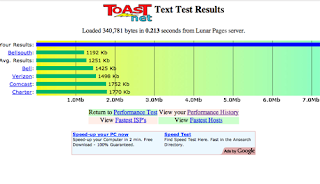
Your connection speed will be represented by the blue bar across the top compared to a few other metrix. So, in this case you'd read that my download speed is almost 13 mb ["mega bits per second"] (sorry, I cut the screenshot off at 7).
It's helpful, but pretty limited as far as useful info. Also, as I mentioned earlier, I found drastically different results when you select anything other than text as your benchmark.
The second tool (which is my #1 recommendation), shows upload speed, download speed, along with a ton of other information and choices on how to run the test. It also archives and compares your past results (this is excellent, because testing on Monday evening will yield far different results from say, Monday Morning since your Cable connection is likely shared among your neighbors).
Anyway, the site is www.speedtest.net, and the results look something like the screenshot below:
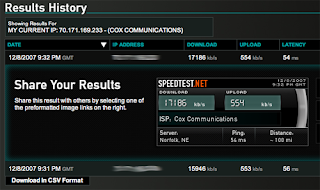
You may notice that in this speed test, I'm getting around 17 mb and 550 kb upload. Those are results I really like to see, so I should disclose that my testing is fairly unscientific, unvalidated by any other tools, and not 100% objective (Which driving range do you prefer? The one where your 210 yard drive goes 210 yards, or the one where it's marked 240?)
Anyway, give these couple of speed tests a try, especially if you feel like you may not be getting what your provider promises. A lot of variables can affect your broadband speed, including your neighborhood hub being at capacity, how many people are currently on, how much resistance your home wiring has, your modem, firmware etc. What it does not take into consideration is how fast your computer is, any hardware devices added to your home network (wireless router, print server, switch, LinkStations, whatever).
Additionally, this can be very good information to have handy before calling up your overpriced provider. It just might be enough to quickly confuse phone monkey #1 and get you on the fast track to "Tier-Two" service where something might actually get done. Please feel free to post back here on your experiences with either of these online tools, or any others.
Finding out the connection speed of your computer to the internet is, in my opinion, very important to know. Your internet speed is not directly tied to your provider (despite what cartoon spokesmen tell you on TV), so it is important to regularly find out for yourself just what kind of upload/download speed you are paying for.
I find it even more important if you are trying to accomplish actual work from home via FTP, Citrix, VPN or simply getting your CEO's latest six-tab spreadsheet of sales figures through Web mail.
I'll briefly discuss a few free online tools I find useful, www.speakeasy.com, www.speedtest.net and www.toast.net.
** NOTE ** I'm making this addition to the article after its original publication. I recently found www.speakeasy.com, which is extremely useful, accurate, and just kinda cool. It takes a minute longer than the others, but that's because it separately runs your upload and download speeds to provide an excellent picture of your broadband speed. I'd also recommend running it periodically to first create a benchmark for your broadband speed so you can compare that with what your ISP is charging you for. The other helpful bit of info I'd keep an eye on is how much your up and download speeds fluctuate. Not a big deal to most people (as long as you happen to be on a spike more often than a dip), but I recently found out that an inconsistent download speed can cause havoc with your VOP router, if you happen to use a service like Lingo, Vonage or whatever.
I would strongly suggest sparing yourself my further analysis (and the next five minutes) and checking out www.speakeasy.com. Because if there's one thing I know about you, it's that you are into efficiency (oh, that and the cable bill thing we talked about earlier). If you are still unsatisfied, return to this article and read on.
* Note: back to original article.
The last one I picked up from a particularly helpful Qwest rep just before dropping their service. It's extremely simple, but doesn't seem to be all that reliable. You have the choice of downloading some very high-res photos, or simply a ton of text (in the form of the Telecommunications Act of 1996). To use it, simply go to toast.net and choose "internet speed test." Choose the size/format of what you want to download, and you will see a chart similar to this one:

Your connection speed will be represented by the blue bar across the top compared to a few other metrix. So, in this case you'd read that my download speed is almost 13 mb ["mega bits per second"] (sorry, I cut the screenshot off at 7).
It's helpful, but pretty limited as far as useful info. Also, as I mentioned earlier, I found drastically different results when you select anything other than text as your benchmark.
The second tool (which is my #1 recommendation), shows upload speed, download speed, along with a ton of other information and choices on how to run the test. It also archives and compares your past results (this is excellent, because testing on Monday evening will yield far different results from say, Monday Morning since your Cable connection is likely shared among your neighbors).
Anyway, the site is www.speedtest.net, and the results look something like the screenshot below:

You may notice that in this speed test, I'm getting around 17 mb and 550 kb upload. Those are results I really like to see, so I should disclose that my testing is fairly unscientific, unvalidated by any other tools, and not 100% objective (Which driving range do you prefer? The one where your 210 yard drive goes 210 yards, or the one where it's marked 240?)
Anyway, give these couple of speed tests a try, especially if you feel like you may not be getting what your provider promises. A lot of variables can affect your broadband speed, including your neighborhood hub being at capacity, how many people are currently on, how much resistance your home wiring has, your modem, firmware etc. What it does not take into consideration is how fast your computer is, any hardware devices added to your home network (wireless router, print server, switch, LinkStations, whatever).
Additionally, this can be very good information to have handy before calling up your overpriced provider. It just might be enough to quickly confuse phone monkey #1 and get you on the fast track to "Tier-Two" service where something might actually get done. Please feel free to post back here on your experiences with either of these online tools, or any others.
Subscribe to:
Posts (Atom)


 Posts
Posts

