Apple's Snow Leopard OS was released today, but before buying, I thought I'd check the list of compatible software just to make sure I don't shoot myself in the foot just to be an early adopter. (Maybe I'll just be a "bargain shopper" and wait for the tablet later this month to get Snow Leopard free?)
Anyway, I noticed Carbonite for Mac was still being tested, while Mozy was already working. Further indication about the direction I might go for data backup (see my past article reviewing personal data backup applications).
The only other one that really caught my eye was GoToMeeting. That thing is a bit of a mess for Macs (and PCs if you want to do anything with the recorded sessions) as it is, so I guess I'm not sure what I'm really hoping for here anyway.
Anyway, I'd love to hear results, comments or reviews from fellow early adopters of Snow Leopard right back here. Happy 64 bit computing!
Showing posts with label Video. Show all posts
Showing posts with label Video. Show all posts
Friday, August 28, 2009

Monday, December 10, 2007
Flash Video Streaming and IIS
One problem that plagues Flash video development is when it simply won't work in production the way it does in development. In later articles, I'll go further into depth on getting it to work at all in Flash, but this article is for you if your .swf is properly streaming video locally, but hits a brick wall when you try and run it out on production.
The obvious thing to check is that you have your .swf and .flv files published to your Web server along with correct path(s) in your Flash file. So, if you truly think everything is in order and still can't get it working, open up IIS and read on.
From your IIS panel, Right+Click your Web site and select "Properties." Choose the "HTTP Headers" tab and look in the "MIME mapping" section for the "File Types" button.
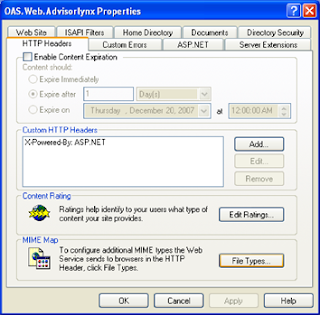
From the "File Types" window you'll need to add a New Type, where you'll have two fields to enter. Carefully enter the following:
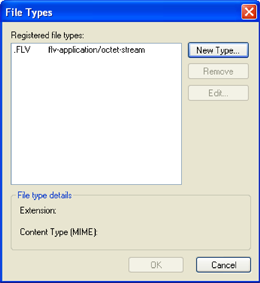
Associated extension = ".FLV"
Content type (MIME) = "flv-application/octet-stream"
Hit "OK" and your results will appear in the Registered file types window, like this:
Of course there are many reasons for Flash Video projects to fail, but I found this one particularly elusive, thus worth mentioning. Please feel free to post additional problems/solutions and I'll expand this tutorial further.
The obvious thing to check is that you have your .swf and .flv files published to your Web server along with correct path(s) in your Flash file. So, if you truly think everything is in order and still can't get it working, open up IIS and read on.
From your IIS panel, Right+Click your Web site and select "Properties." Choose the "HTTP Headers" tab and look in the "MIME mapping" section for the "File Types" button.

From the "File Types" window you'll need to add a New Type, where you'll have two fields to enter. Carefully enter the following:
Associated extension = ".FLV"
Content type (MIME) = "flv-application/octet-stream"
Hit "OK" and your results will appear in the Registered file types window, like this:

Of course there are many reasons for Flash Video projects to fail, but I found this one particularly elusive, thus worth mentioning. Please feel free to post additional problems/solutions and I'll expand this tutorial further.
Subscribe to:
Posts (Atom)


 Posts
Posts

